Designed the internal tool that let chefs write recipes a machine could actually cook, replacing a manual, code-dependent process with something any chef could use directly.

Overview
A recipe written for a person and a recipe written for a machine are not the same thing. A person can improvise, guess quantities, and adjust on the fly. A machine can't. This case study covers the design of the Smart Recipe Writer, a tool that let chefs and content creators at Klynk write "smart recipes," recipes precise enough for Semi and Riku to execute, and simple enough for a novice cook to follow.
Background
Klynk needed its recipe database to grow fast, both to make its smart hardware, Semi (an induction cooktop) and Riku (an automated rice and curry maker), useful out of the box, and to support Klynk Recipes, a food content space for chefs and influencers. Every recipe in that database had to work differently depending on the hardware: some steps needed to be fully automated for Riku, others guided for Semi, others left entirely manual. Building and growing that database was core to the product working at all.

Problem
Every recipe Klynk's hardware could cook needed to exist in a form precise and structured enough for a device to execute step by step, not just something readable by a human. Before this tool existed, that translation work fell entirely on engineers: coders manually input every recipe into the database by hand. It was slow, didn't scale, and depended on people who weren't chefs to encode culinary logic correctly. Chefs and creators, the people who actually knew the dish, had no direct way to contribute one themselves.
How might we let chefs and creators, write recipes that are precise enough for a machine to execute and simple enough for a novice cook to follow, without either group needing to touch code?
Process
The project followed five phases: Strategy, Scope, Structure, Skeleton, and Surface.

1. Strategy
Every stage of research, business-facing and user-facing, sat under this first phase, since all of it was aimed at the same question: what does this tool actually need to be, and for whom?
Ecosystem Mapping
Mapped every internal and external entity connected to the recipe platform (internal chef teams, external creators, hardware, downstream apps) and how they linked together, to understand who this tool actually needed to serve.

Value Proposition Mapping
Built out value proposition canvases from two angles: the internal team (Riku hardware, filterable database, sharing recipes to the community) and external creators/chefs (auto-generated recipe versions, quick recipe creation, insight into their audience), each mapped against real user wants, needs, and fears (e.g. "frustrated by fragmented recipe databases," "confusing interface, too complex," "intangible storage, I don't own my recipes").

Internal Stakeholder Interviews
Interviewed internal stakeholders to understand business goals for the platform short-term and long-term, who the real users were, and what problems existing recipe platforms in the market already had.

Quantitative & Qualitative Research
Audited around 20 existing recipe platforms, then narrowed to direct competitors with both hardware and software offerings for closer comparison: Chefling, BigOven, Yummly, and Whisk. Each was evaluated for strengths (e.g. Chefling's third-party hardware integrations, BigOven's leftover-focused recipe suggestions, Yummly's multiple guided cooking modes, Whisk's social/community meal-planning features) and weaknesses (static/outdated design, clunky recipe entry via copy-paste, no real hardware tie-in, disconnected features).
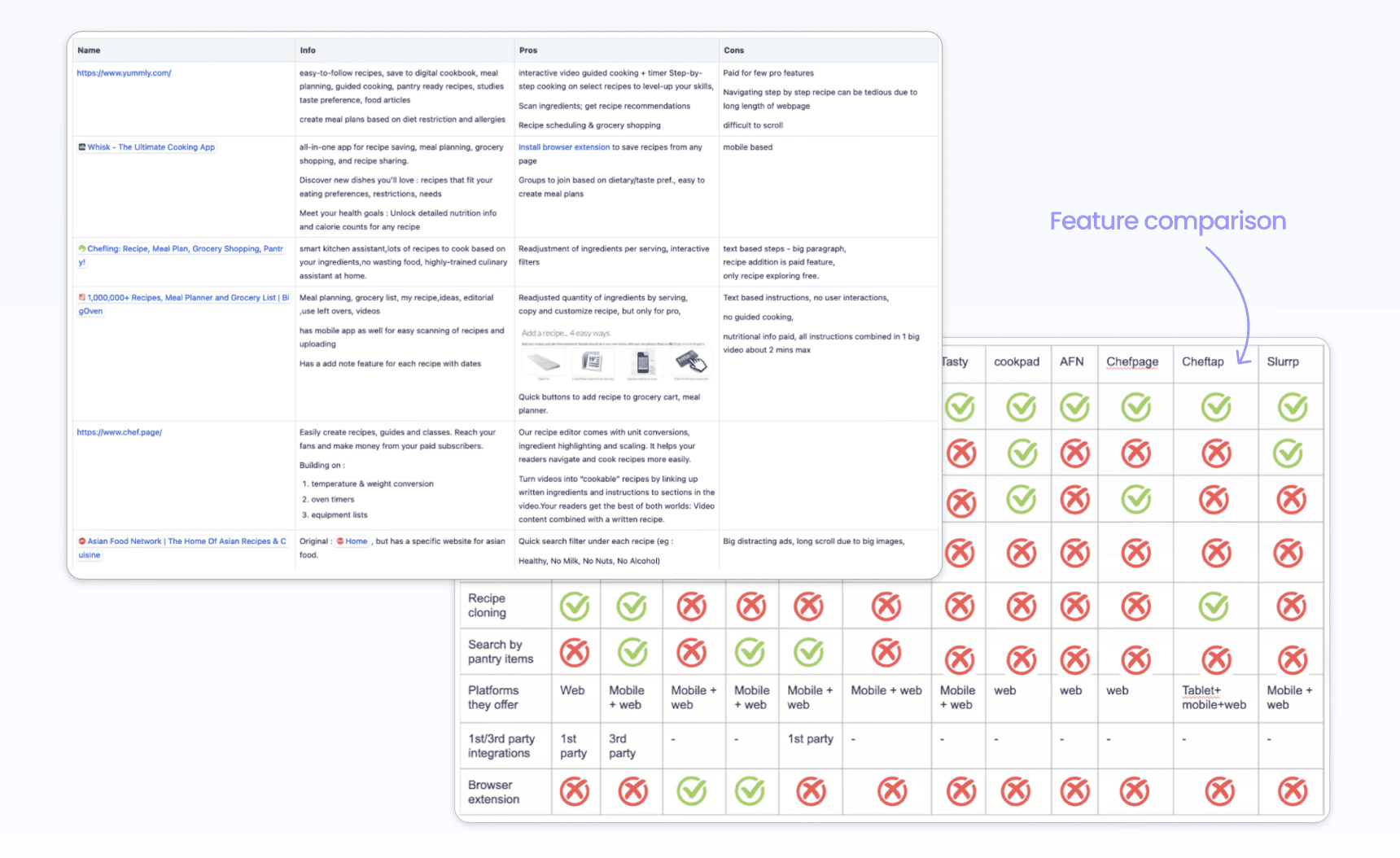

Tool Audit & Competitor Teardowns
Went deeper into direct competitors with a recipe-onboarding flow (including Whisk and Meez for professionals), signing up and using their services firsthand, mapping out their actual screen-by-screen flows and annotating what worked and what didn't at each step.

User Interviews
Ran remote interview sessions with chefs and content creators to understand their actual recipe-creation habits: what tools they currently used, whether they made money from their content, why they preferred video over written recipes (or vice versa), and where the real pain points were in going from "idea" to "published recipe."

User Personas & Empathy Maps
Synthesized interview findings (e.g. one interviewee only shared recipes via voice note/DM when asked, wanted to hand down recipes to her daughter through easier, more interactive tools than plain text) into personas and empathy maps to keep the design grounded in real people rather than assumptions.
2. Scope
With research complete, the next question was what to actually build first. This came together as a cross-functional exercise, not a solo one: working alongside the CEO, PM, and developers, we wrote roughly 200+ user stories covering the full range of how someone might use the recipe platform, from adding a recipe and sharing it publicly, to browsing the platform as a consumer and sending a downloaded recipe straight to a hardware device to cook.
Story Brainstorming — Generated the full set of 200+ user stories as a team, deliberately covering both sides of the platform (the creator writing and publishing a recipe, and the consumer discovering and cooking one) rather than designing for just one user type in isolation.
Analysis & Segregation — Evaluated every story against two axes: effort to build and value to the user. Low-effort, high-value stories became the MVP; high-effort stories were pushed to later versions rather than delaying launch.
Version Scopes & Assigning — Used that effort/value split to define concrete version scopes, so the roadmap was driven by what was actually worth building first, not just what was easiest to sequence.
3. Structure
This phase defined what the tool actually needed to capture and how its underlying logic would work across every device it had to support.

Cross-Hardware Command Architecture
Since one recipe could need to run on three different setups (Manual, Semi, or Riku), the underlying command system was designed so each mode inherited from a shared base rather than being built three separate times:
Semi acts as the base. Riku's induction is essentially Semi without a screen, so the same heating and timer commands work across both.
Riku extends Semi with additional commands for what it alone can do: dispensing, stirring on/off, lid control, and other fully automated actions.
Manual mode simplifies the same underlying logic into plain, familiar terms instead of exact technical values (e.g. a temperature range becomes "low heat" instead of "50-90°C").
This meant compatibility wasn't automatic in every direction: every Riku recipe works on Semi and Manual, but not every Semi recipe (one using a temperature probe, for instance) is Riku-compatible. By default, every recipe has a Manual version as its baseline, with Semi and Riku layered on top where applicable. Hardware constraints were also surfaced directly in the tool itself: for example, a recipe's total fresh-ingredient volume can't exceed what Riku's pods can physically hold, so the tool flags this and asks the creator to adjust rather than letting an invalid recipe through.

4. Skeleton
Ideation — Started with pen-and-paper sketches to support divergent thinking before committing to any single direction, covering the image gallery, step-by-step instruction blocks, and recipe metadata (time, difficulty, tools).
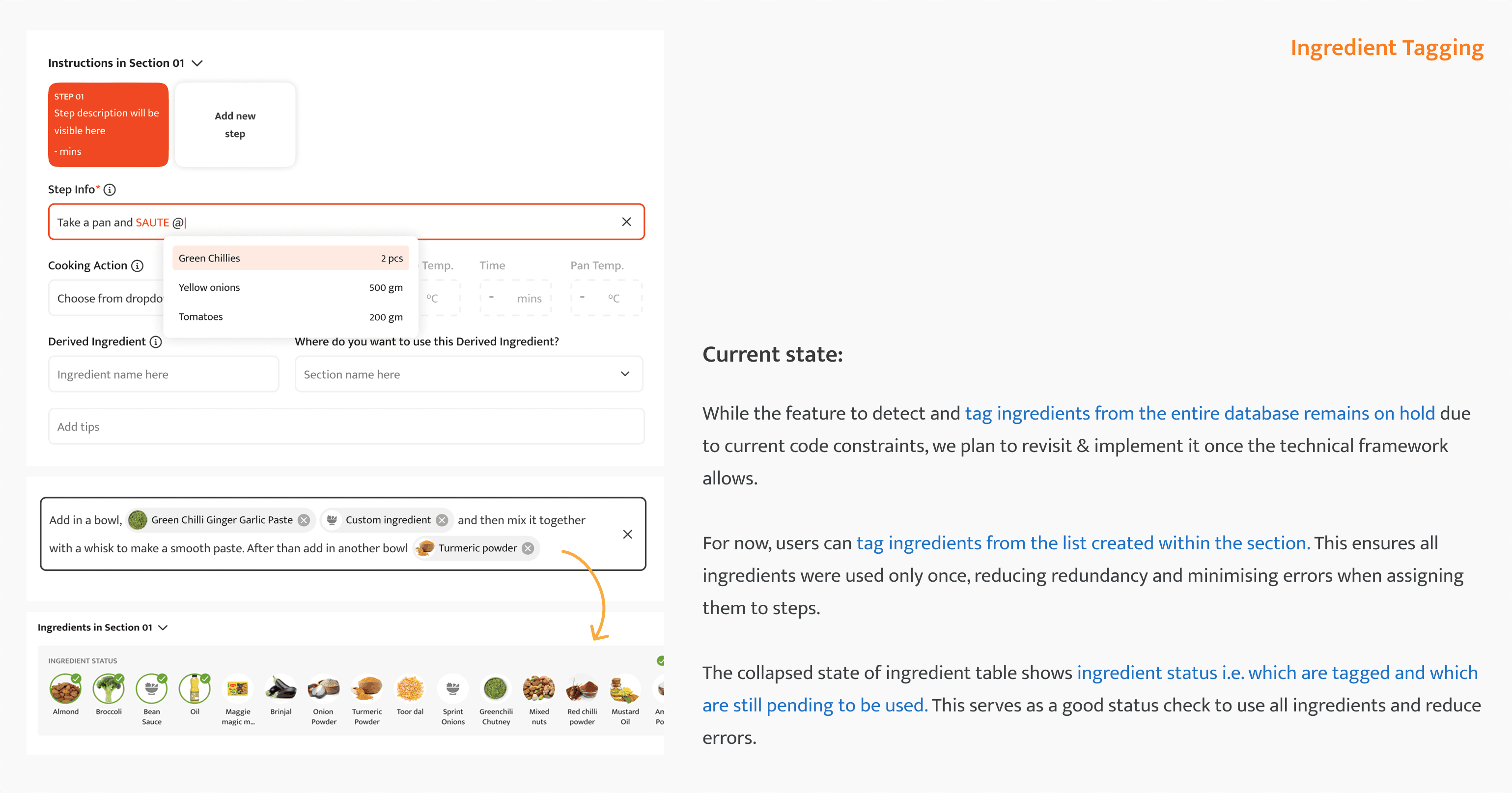
Wireframing & Iteration — After stakeholder buy-in, moved into low-fidelity (grayscale) digital wireframes, which went through three rounds of real iteration before landing:


5. Surface
With the wireframes validated, the final UI was built out for handoff to developers.
Typography: Roboto Slab (headings) and Mukta Mahee (body)
Colors:
#EF4823(primary orange),#282828(near-black),#E1E4E5(light gray),#FAE5DD(soft peach)High-fidelity prototypes were built for both web and mobile, covering the full recipe-creation flow end to end.

Final Product
The final tool, shown across both platforms it was built for:
Web — High-Fidelity Prototype
Mobile — Recipe Creation Tool
Impact
Testing also surfaced a handful of features that shaped
the tool beyond its original scope:
Prep photos:
Users wanted to see prepped ingredients before cooking to judge quantities and prep style, but a full prep-image database for every ingredient wasn't feasible in the short term. The fix was letting creators upload a single photo showing all their prepped ingredients together, a fast solution that bought time to build a fuller image library later.

Serve Instructions:
Based on stakeholder feedback that a recipe's last step should leave a strong impression, a dedicated field was added for plating and serving tips, giving every recipe a proper close instead of ending abruptly after the last cooking step.

Interactive recipe preview:
Since this tool introduced a genuinely new way of writing recipes, creators wanted to catch mistakes before publishing, so an interactive preview was added to simulate exactly how a recipe would look and behave inside the app before going live.

Reflection
User research:
This project deepened my ability to put users at the center of the design process through real interviews, empathy maps, and usability testing, rather than designing from assumptions about how chefs or creators would want to write a recipe.
Agile Methodologies:
Working within a small, fast-moving team taught me how agile actually functions in practice, through design sprints and recurring design review meetings, not just in theory.
New Software — Figma:
As a full-time employee on this project, I had the chance to properly learn Figma, which became a core part of how I designed and handed off work from this point forward.